Record locally without interrupting meetings
Mem records system audio and your microphone locally, so your meeting stays private and no visible bot joins the call.
Feature
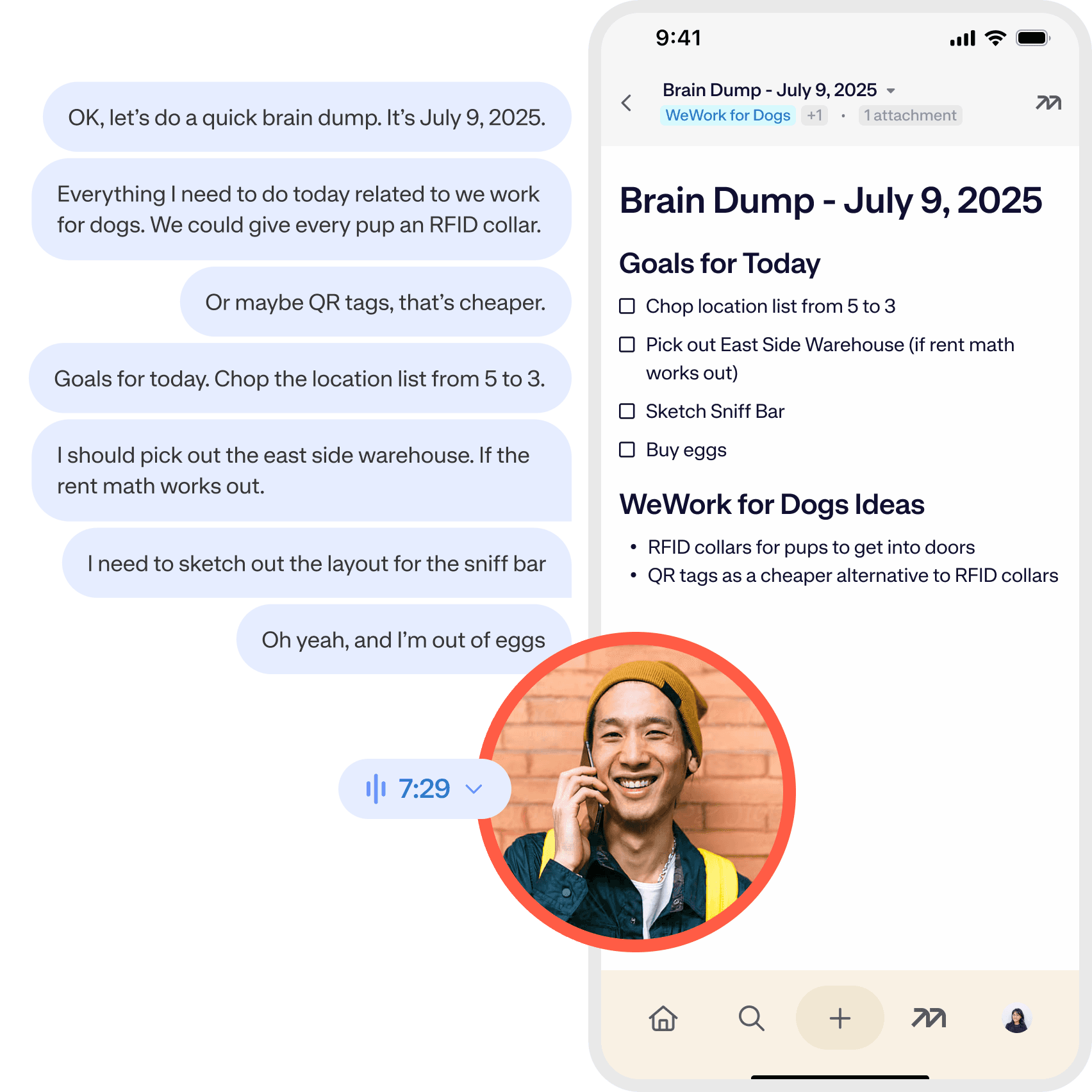
Speak your mind, no matter how messy. Mem effortlessly captures and cleans your ideas and meetings so you can stay focused.
How it works
Capture first, organize later. Mem keeps the source, context, and next step together so your notes become useful the moment you need them again.
Mem records system audio and your microphone locally, so your meeting stays private and no visible bot joins the call.
Capture stream-of-consciousness thoughts, meeting details, and voice memos without stopping to structure them first.
Accept Mem's note immediately or refine it with follow-up instructions until it has the format you want.
The audio and transcript stay attached to your note so the polished summary and original context travel together.
FAQ
Mem's Help and Support center covers this in detail for each platform.
Mem's Help and Support center covers this in detail for each platform.
Mem's Help and Support center covers this in detail for each platform.
Mem's Help and Support center covers this in detail for each platform.
A match for great minds
I no longer worry about how I organize notes into different apps. I toss it in Mem and know it will be there when I need it.Zach Price, Founder at Impulse to Impact